
The Best Payload CMS 2FA Plugin — My Experience & Setup Guide
I'm about to talk about some of my personal story, how I came up with this plugin, the issues I faced, and my personal experience as a developer. If you're here just to learn about the plugin and install it, scroll down to near the end of the blog, where you'll find the Setup section. That's where you'll find what you're looking for, and I've also attached the documentation links there. Happy reading!
See, I love Payload CMS, and I have been using it for almost every project. The reason is very straightforward: it just works.
No hidden charges, completely open source, and when it comes to customization, you can achieve almost everything you want.
But.... wait....
I had to rethink some of my decisions because of one missing feature.
Yes.
Two-factor authentication was missing.
See, if by any chance my password gets leaked, I'm done. Anyone who has the password can potentially access the account. And that is where the problem started.
Many of my clients were looking for a TOTP-based system, or at least an email OTP-based system. But Payload CMS does not ship with 2FA as part of its standard authentication system.
I don't know why. Payload was almost the perfect CMS for me, but because of this one small missing piece, I had to rethink a few projects.
The Problem With Existing Options
There are other community plugins available in the ecosystem, and I really appreciate the people building them. But for me, stability and maintenance were the biggest concerns.
Some of them introduced bugs or required additional changes to the existing project. And honestly, I can't blame the maintainers. Most of these are community projects built by independent developers, often without the resources or support of a larger project.
At the same time, you don't really want to experiment with authentication on a production application.
Authentication is one of those things where "it mostly works" is not good enough.
Then Comes Better Auth
Now comes Better Auth.
And honestly, Better Auth is an excellent authentication solution. It has a much broader feature set, including TOTP 2FA, backup codes, trusted devices, and other authentication capabilities.
There are also Payload integrations built around Better Auth that provide a much more complete authentication system. For example, payload-auth explicitly replaces Payload's built-in authentication with Better Auth, while other integrations provide things like sessions, social authentication, 2FA, passkeys, and more.
And that's actually where the problem comes in for my use case.
Better Auth is not just a small 2FA addition.
It becomes your authentication layer.
That's perfectly fine if you are starting a new application and want all of those authentication features from the beginning.
But what about an application that has already been running in production for months or years?
What happens when the application was built around Payload's native authentication system, and suddenly you introduce a completely different authentication layer?
Now you have to review the places where authentication is being used, understand the new session model, adapt your existing auth logic, and potentially change parts of the application that were built around Payload's native auth behavior.
That's not necessarily a problem with Better Auth.
It's simply a different approach.
And for an existing Payload application, that difference can be a very important consideration.
What I Actually Wanted
So I started thinking:
What if someone already has a Payload application in production?
They are happy with Payload's native authentication.
They don't need social login.
They don't need passkeys.
They don't need a complete authentication platform.
They just want one thing:
2FA.
A lightweight solution that doesn't force them to replace their existing authentication system.
That was the actual problem I wanted to solve.
That's Where Payload 2FA Comes In
That's where this ultra-lightweight TOTP-based plugin shines.
It just works.
Seriously.
You install the plugin, add it to your Payload configuration, configure the required secret, generate the import map, and you're ready to enable 2FA from the Payload Admin Panel.
The plugin is built around Payload's native authentication system, rather than replacing it with another authentication layer.
That means you can keep the authentication architecture you already have and simply add another layer of security on top of it.
And that's really the idea behind it.
You shouldn't have to rebuild your authentication system just because you want TOTP.
The package is:
1pnpm add @assamlabs/payload-2fa
What @assamlabs Payload 2FA Provides
The plugin gives you:
- TOTP-based authentication
- QR-code setup
- Backup codes
- Enable and disable 2FA
- A dedicated 2FA login flow
- Admin Panel integration
- Support for custom authentication collections
- Configurable TOTP issuer
- Login protection through Payload's native authentication flow
And the setup is intentionally minimal.
You don't need to replace your existing authentication system just to add 2FA.
Payload 2FA vs Better Auth
Now, this is where I want to make something very clear.
You cannot really compare Payload 2FA and Better Auth as if they are trying to solve exactly the same problem.
Better Auth is a complete authentication framework with a much broader feature set. Its 2FA plugin alone supports TOTP, OTP, backup codes, and trusted devices.
Payload integrations built around Better Auth can also provide sessions, social providers, passkeys, roles, API-related functionality, and other authentication features.
Payload 2FA has a completely different goal:
Keep Payload's native authentication and add 2FA to it.
So the better choice depends on what you actually need.
| @assamlabs/payload-2fa | Better Auth + Payload integration | |
|---|---|---|
| Main goal | Add 2FA to Payload | Replace/extend authentication with Better Auth |
| Payload native auth | ✔ Keeps it | Depends on integration; some replace it |
| TOTP 2FA | ✔ | ✔ |
| Backup codes | ✔ | ✔ |
| QR setup | ✔ | ✔ |
| Custom authentication collections | ✔ | Depends on integration |
| Social authentication | ✖ | ✔ |
| Passkeys | ✖ | ✔ |
| Trusted devices | ✖ | ✔ |
| Full authentication framework | ✖ | ✔ |
| Changes existing auth architecture | Minimal | Potentially significant |
| Best for existing Payload apps | ✔ | Depends on requirements |
| Best for new apps needing advanced auth | Basic | ✔ |
For example, payload-auth explicitly says that it replaces Payload's built-in authentication with Better Auth, while other Better Auth integrations similarly introduce Better Auth as the authentication layer.
So I don't look at Better Auth as a competitor in the traditional sense.
Better Auth is the better choice when you need a complete authentication solution.
@assamlabs Payload 2FA is the better choice when you're already happy with Payload's authentication and simply want to add TOTP 2FA.
So Which One Should You Use?
This is how I personally look at it.
If I'm starting a completely new project and I know I need:
- Social login
- Passkeys
- Multiple authentication methods
- Advanced sessions
- Trusted devices
- A larger authentication ecosystem
Then Better Auth is absolutely worth considering.
But if I already have a Payload application in production and everything is working perfectly with Payload's native authentication, and suddenly I just need 2FA...
I don't want to replace my authentication system.
I don't want to rewrite parts of my application.
I don't want to introduce another authentication architecture just for one feature.
I just want 2FA.
And that's exactly why I built:
Setup
The installation is intentionally simple.
1pnpm add @assamlabs/payload-2fa
Then add the plugin:
1import { twoFactorAuth } from "@assamlabs/payload-2fa";23export default buildConfig({4 plugins: [5 twoFactorAuth(),6 ],7});
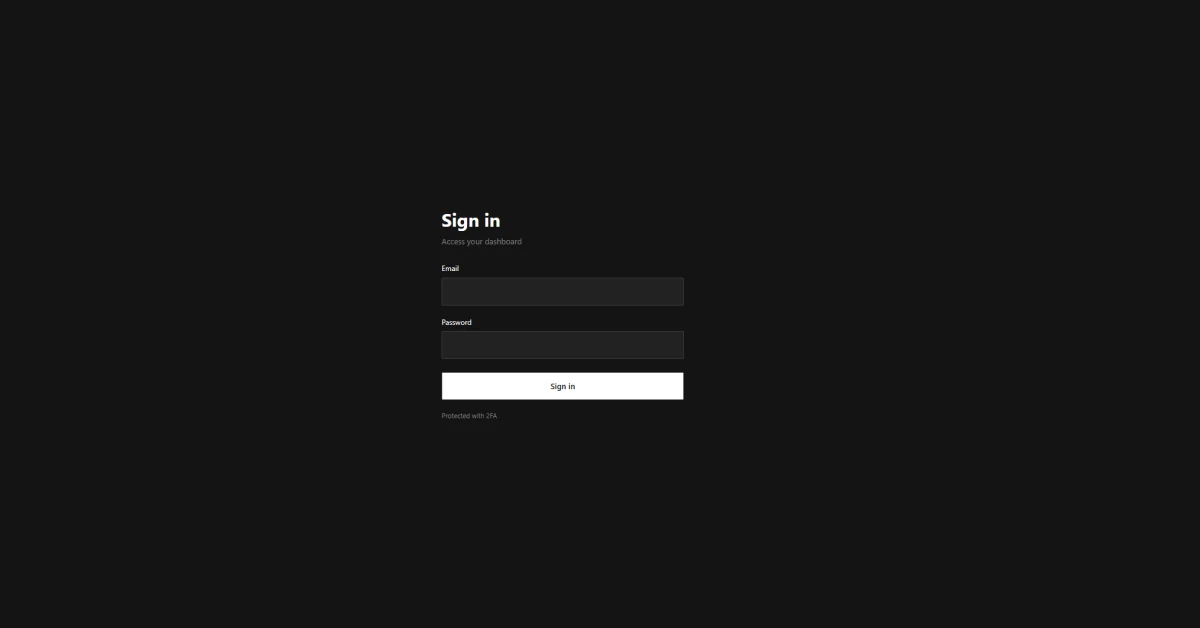
Payload 2FA Login Screenshot
There is also a required server-side secret and a Payload import-map step. The complete installation process is documented here:
Read the complete Payload 2FA documentation
My Final Take
Payload CMS is still one of my favorite tools for building applications.
The reason is simple.
It gives you a very strong foundation without forcing you into a specific way of building your application.
For me, 2FA was one of the few things that was missing from that experience.
And instead of replacing Payload's authentication system to solve it, I wanted a plugin that followed the same philosophy:
Install it. Configure it. Use it.
That's what Payload 2FA is designed to do.
It's not trying to be Better Auth.
It's not trying to become another authentication framework.
It is simply trying to add secure, lightweight TOTP-based 2FA to the Payload authentication system you already use.
And for that specific use case, this is the solution I wanted to have from the beginning.






I’m a Software Engineer from Northeast Assam, India, with 10+ years of experience in the field of computer science. Over the years, I’ve worked with large enterprises and well-established companies, helping them design, build, and scale robust software solutions.