
How Complicated Is It to Self-Host a Next.js and Payload CMS App?

If you're looking for a self-hosting solution, then you're probably in one of these situations.
Either Vercel is starting to feel like a trap because your usage is growing and the bill keeps increasing, or it simply doesn't make sense to pay separately for hosting, a database, object storage, image optimization, bandwidth, and everything else.
I mean, come on...
Next.js is open source. One of its biggest advantages is that you can host it wherever you want without giving up any of its core features. Why should I have to worry about image optimization budgets, API limits, bandwidth calculations, or a dozen different usage-based pricing metrics?
Don't worry.
I'm here to tell you why self-hosting a Next.js application isn't as difficult as people make it sound.
What Do You Actually Need?
A server to run your app, a database to store your content, and object storage for files, images, videos, and other uploaded assets.
That's it.
Because of the headless architecture of Next.js and Payload CMS, these services are usually separated, which often makes people think the setup is complicated and expensive.
But what if I told you that you can host both your application and your database on a single server?
No image optimization bills.
No API request limits.
No platform-specific restrictions.
Just one server running your application the way you want it.
Tools I Personally Recommend
There are quite a few self-hosting platforms available today, but these are the ones I like the most.
Coolify
Why not?
It's probably the closest experience you'll get to Vercel while remaining completely self-hosted.
You can deploy your Next.js application, PostgreSQL, Redis, and many other services on the same server with just a few clicks. It handles deployments, environment variables, domains, SSL certificates, and Docker containers without requiring you to manually configure everything.
Dockploy
Dockploy follows a very similar approach.
If you've used Coolify before, you'll feel right at home. It also provides a clean interface for deploying Docker-based applications and managing your infrastructure from one place.
So... Is Self-Hosting Actually Complicated?
My answer is...
It depends.
If you're completely new to Next.js and have never deployed your own applications before, then yes, it's probably going to feel difficult.
Not because hosting itself is hard.
Hosting is actually the easy part.
The real challenge starts after your application is online.
When you're hosting on Vercel, many things "just work." That's because Vercel understands Next.js inside out.
When you move to your own server, you're responsible for everything.
And that's where you start discovering problems that platforms like Coolify or Dockploy simply cannot solve for you.
For example...
Let's say you're logged into your Payload CMS dashboard while developing.
You push new code to GitHub.
Coolify automatically deploys the latest version.
Everything looks successful.
Then you refresh the admin dashboard...
Suddenly the application crashes.
The server becomes slow.
You immediately assume you introduced a bug in your code.
You start reviewing commits.
You check the logs.
You spend the next hour debugging something that isn't even your fault.
In reality, it's one of those small Next.js or Payload CMS deployment quirks that you only discover once you start self-hosting.
The exact same project deployed on Vercel might continue working without any issues because Vercel handles some of these situations differently.
These are the kinds of problems nobody tells you about when they say, "Just self-host it."
There Are Workarounds for Almost Everything
I'm not going to cover every production issue in this article.
That deserves a completely separate blog.
What I want you to understand is this...
Most of these problems already have solutions.
Once you build your own little rulebook of things to check during deployment, self-hosting becomes much easier.
I've built that rulebook over the years.
Several of my applications have been self-hosted for years now, and they run without any major issues.
After a while, these deployment quirks simply become part of your workflow.
My Difficulty Rating
If I had to rate the learning curve, this is how I'd describe it.
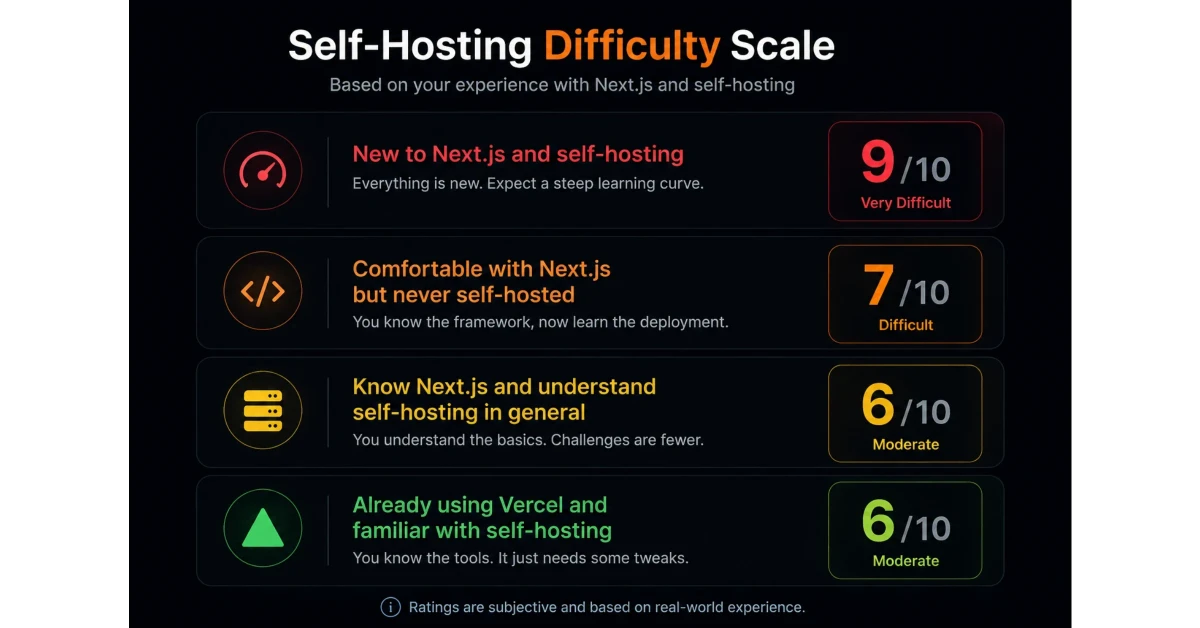
Why doesn't it go lower?
Because even experienced developers will run into a few Next.js-specific challenges that don't exist on managed platforms.
Once you know those workarounds, though, the rest becomes fairly straightforward.
Should You Self-Host?
Definitely.
But only if you're willing to be patient and spend some time learning how everything fits together.
Getting a stable production setup doesn't happen overnight.
You'll need to understand your server, Docker, networking, storage, databases, deployments, and a few Next.js-specific behaviors.
But trust me...
It's not rocket science.
And today we have something developers didn't have a few years ago—AI.
When you get stuck, AI can help you understand what's happening, point you in the right direction, and save hours of debugging.
So don't be afraid to try.
Even if you eventually decide managed hosting is better for your use case, the knowledge you gain from self-hosting is incredibly valuable.
And if you stick with it, you'll probably save a significant amount of money while gaining complete control over your infrastructure.
Start self-hosting today.
Don't hesitate.
It takes some effort in the beginning, but once everything is set up, you'll wonder why you didn't start sooner.








I’m a Software Engineer from Northeast Assam, India, with 10+ years of experience in the field of computer science. Over the years, I’ve worked with large enterprises and well-established companies, helping them design, build, and scale robust software solutions.