
Creating a Live News Feed in Next.js Without Hurting SEO with Client-Side Fetching

Live news feeds are something you'll probably want to implement if your website covers sports, breaking news, elections, finance, or any topic where readers expect updates in real time. Most major news websites have already adopted this way of interacting with their audience, and if you're here, I'm guessing you're trying to build something similar.
But wait...
I'm not here to show you how to build a live feed. That's honestly the easy part.
Fetching data every few seconds using JavaScript from an API endpoint and rendering it in a list is something almost every developer already knows how to do.
That's not why I'm writing this article.
I'm here to show you how to build a live news feed that both your users and search engines can actually see.
Because here's the problem...
Most live feeds are built entirely on the client side. The browser loads the page, JavaScript runs, it calls an API every few seconds, and new posts start appearing.
It works perfectly for your users.
But search engines don't always see those updates.
Many crawlers still rely heavily on the initial HTML returned by your server. If your live feed only exists after JavaScript runs, you're depending on the crawler to execute your client-side code. Some do, some don't, and even when they do, you can't predict when or how completely they'll process it.
I'd rather not leave SEO to chance.
The Idea
The solution is actually very simple.
We'll combine Server Components and Client Components so both search engines and users get the best experience.
The workflow looks like this:
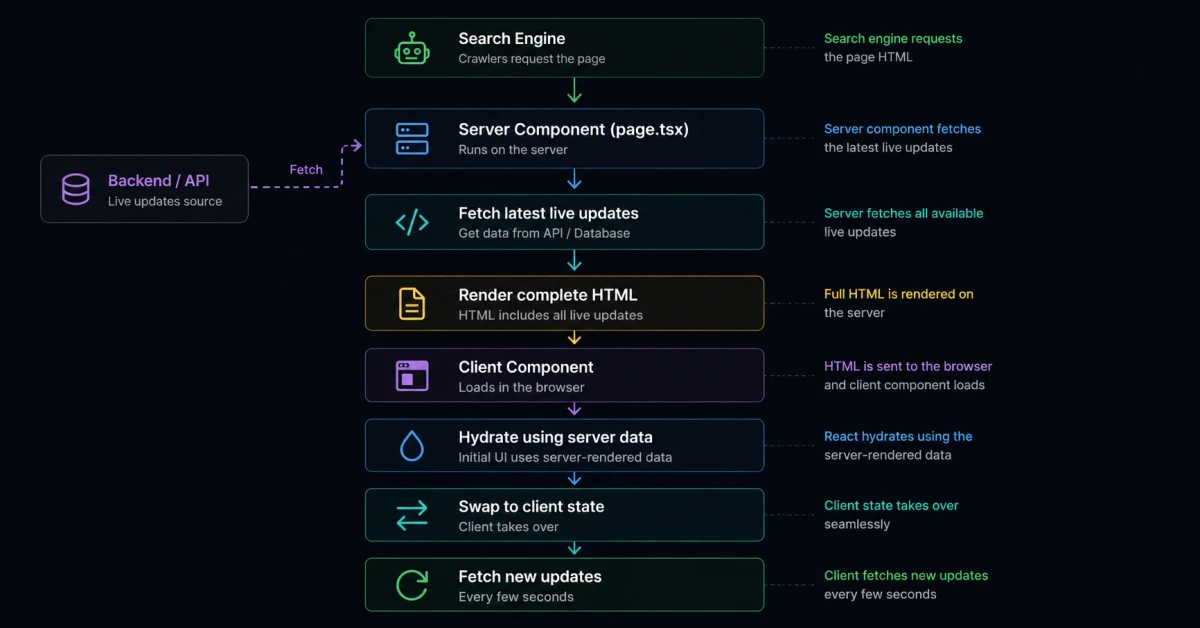
The initial HTML contains every live update available at request time, making it immediately visible to search engines.
Once the page is hydrated, the client quietly takes over and starts polling for new updates.
The visitor never notices the transition.
Step 1 — Fetch Everything on the Server
Your page.tsx should remain a Server Component.
This is where you'll fetch your latest live updates.
The important thing here is that this request happens before the HTML is generated.
That means every live update already exists in the page source.
1// page.tsx23const livePosts = await getLivePosts()45return (6 <LiveFeed7 initialPosts={livePosts}8 />9)
At this point, search engines already have access to every update because they are part of the server-rendered HTML.
This is the entire reason we're doing it this way.
Step 2 — Pass the Data to a Client Component
Now create a Client Component.
Instead of immediately making another API request, initialize the component using the data that came from the server.
1'use client'23export default function LiveFeed({4 initialPosts,5}: {6 initialPosts: LivePost[]7}) {8 const [posts, setPosts] = useState(initialPosts)910 return (11 <>12 {posts.map(post => (13 <LivePostCard14 key={post.id}15 post={post}16 />17 ))}18 </>19 )20}
Notice that we're not fetching anything yet.
We're simply displaying the exact data that the server already rendered.
This keeps hydration clean and avoids unnecessary loading states.
Step 3 — Let the Client Take Over
Now comes the interesting part.
After hydration, the client silently starts requesting the latest data from a dedicated API endpoint.
1useEffect(() => {2 async function fetchUpdates() {3 const response = await fetch('/api/live-feed')45 const latestPosts = await response.json()67 setPosts(latestPosts)8 }910 fetchUpdates()1112 const interval = setInterval(fetchUpdates, 10000)1314 return () => clearInterval(interval)15}, [])
The user never notices this.
The server-rendered list simply becomes the client-managed list.
From this point onward, the feed updates automatically.
Step 4 — Keep the API Response Identical
One important thing I always recommend...
Return the exact same data structure from your API that your server component returns.
That means if your server renders this:
1[2 {3 id: 1,4 title: "...",5 publishedAt: "...",6 slug: "...",7 }8]
Your API should return the same shape.
That makes replacing the server data with the client data almost effortless.
Why I Fetch the Entire List
For this guide, I'm fetching the complete list every time.
Is it the most optimized solution?
No.
Could you fetch only new posts using timestamps, offsets, cursors, or IDs?
Absolutely.
Could you merge new updates instead of replacing the whole array?
Of course.
But that's not the point of this article.
I'm here to build the foundation.
Once you understand this architecture, implementing incremental updates becomes fairly straightforward.
Why This Approach Is Better for SEO
Imagine you're covering a Formula 1 race.
Your website publishes every important event as it happens.
- Safety Car deployed
- Max Verstappen pits
- Rain starts
- Red Flag
- Race resumes
These updates might be unique.
They might even appear before bigger news websites publish them.
If your live feed only exists on the client side, there's no guarantee search engines will ever discover those updates quickly.
On the other hand, if every page request already contains the latest live updates in the HTML source, crawlers immediately see them.
That's exactly what you want.
Search engines don't have to wait for JavaScript.
They don't have to execute additional requests.
They simply receive the latest information directly from the server.
For breaking news, that's a huge advantage.
Final Thoughts
This architecture gives you the best of both worlds.
Your visitors get a real-time live feed that updates automatically without refreshing the page.
Search engines get fully rendered HTML containing every live update available at request time.
It's simple, scalable, SEO-friendly, and easy to extend later with WebSockets, Server-Sent Events, cursor-based pagination, or incremental fetching.
Start with this foundation, and you'll have a live news system that works for both your users and your search rankings.








I’m a Software Engineer from Northeast Assam, India, with 10+ years of experience in the field of computer science. Over the years, I’ve worked with large enterprises and well-established companies, helping them design, build, and scale robust software solutions.